Poland’s e-Delivery system (Polish: e-Doręczenia) is the electronic equivalent of registered letter with acknowledgement of receipt. Polish authorities can use it to officially send companies decisions, notices, reminders and other documents.
Since 1 January 2026, e-Delivery has become the primary means of electronic correspondence between public and non-public entities, unless specific legal provisions require a different method of serving documents. Companies operating in Poland should therefore not only activate their e-Delivery mailbox but also check it regularly.
Why Should You Check Your e-Delivery Mailbox Regularly?
Official correspondence may be sent to your e-Delivery mailbox. The date on which it is served may trigger deadlines for submitting a response, providing additional documents or appealing a decision.
Important: if the recipient does not open a message, it may be deemed legally served once 14 days have elapsed since its delivery to the e-Delivery mailbox.
This means that simply leaving a message unread generally does not protect you from legal consequences. The deadline for taking a particular action may begin to run from the legally established date of service.
We therefore recommend that you:
- Check your e-Delivery mailbox at least several times a week.
- Make sure the email address registered in the system is up to date.
- Open incoming correspondence promptly.
- Appoint an employee or authorised person to manage the mailbox.
A notification sent to your regular email address only informs you that new correspondence has arrived. The official document is available in your e-Delivery mailbox, so you need to log in to the system after receiving such a notification.
How to Log In to Your e-Delivery Mailbox
Go to the e-Doręczenia Website
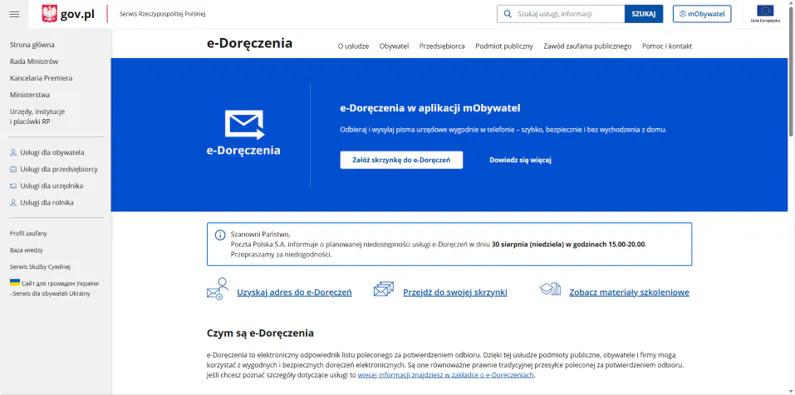
Go to the e-Doręczenia website. On the homepage, click “Przejdź do swojej skrzynki” (“Go to your mailbox”).
Choose a Login Method
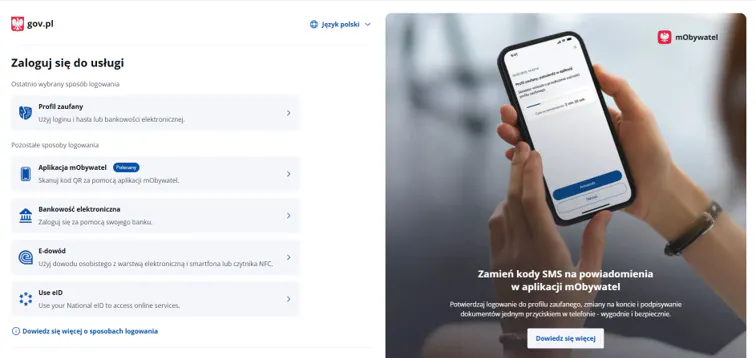
Select one of the identity verification methods offered by the system. For example, you can log in using a Trusted Profile (“Profil Zaufany”), online banking, an electronic identity card or the “mObywatel” app. Choose the appropriate method and verify your identity.
Select Your Company’s e-Delivery Mailbox
Once you have logged in, you will see all the e-Delivery mailboxes you are authorised to access. In the “Służbowe” (“Business”) section, find the relevant company name and click “Przejdź do skrzynki” (“Go to mailbox”) beneath it. If you have access to several mailboxes, make sure you select the mailbox of the company whose correspondence you want to check.

Open the List of Received Messages
After selecting your company’s e-Delivery mailbox, you will be taken to its main screen. In the menu on the left, click “Odebrane” (“Inbox”).
You will see a list of received messages. Each entry shows the sender (“Nadawca”), the subject (“Temat”) and the delivery date (“Data doręczenia”).
To read a message, click its subject.

Open and Read the Message
In the list of received messages, click the subject of the message you want to open. In the window that appears, check the sender, recipient and date of receipt, then read the message.
If any documents are attached, remember to open and download them. To download the message itself, click “Pobierz” (“Download”). To return to the list of received messages, click “Powrót” (“Back”).

Done!
You can now check incoming messages and read correspondence sent to your e-Delivery mailbox.
Sending Documents Through Your e-Delivery Mailbox
Once you have logged in to your company’s e-Delivery mailbox, you can check and read incoming correspondence, as well as send letters, applications, explanations and other documents to Polish authorities that have an electronic delivery address.
To create a new message, click “Napisz wiadomość” (“Write a message”). Then select the recipient, enter the subject and message text, and attach the required documents.
After you send a message, the system provides proof of sending and delivery. We recommend downloading these records and keeping them with the other documents relating to the case. Sending documents electronically is generally faster than sending correspondence by traditional post.
Frequently Asked Questions
Yes. A letter may be considered legally delivered 14 days after it is placed in the e-Delivery inbox, even if it has not been opened. Therefore, the inbox should be checked regularly.
No. Your regular email usually only receives a notification that new correspondence has arrived. You need to read the official document in your e-Delivery mailbox.
Yes, provided they have been granted the appropriate permissions to access the company’s mailbox. It is advisable to clearly designate a person within the company who is responsible for checking this correspondence.

Unless stated otherwise - Savesta.eu texts are distributed under the CC BY-NC-ND 4.0 DEED license. The distributed content cannot be considered as professional legal advice or consultation.